Introduction
Optical Character Recognition (OCR) has played an essential role in business automation for decades. It enables organisations to convert printed and handwritten information into machine-readable text, supporting everything from document digitisation to invoice processing and information retrieval.
However, traditional OCR workflows often encounter difficulties when dealing with real-world images. Text may appear at unusual angles, overlap with visual elements, or be embedded in complicated backgrounds. These challenges can reduce recognition accuracy and increase the need for manual correction.
This is where modern computer vision architectures are changing the way businesses approach text extraction.
YOLO26, developed by Ultralytics, introduces advanced text detection capabilities that can be combined with specialised OCR recognition models to improve how visual information is processed.
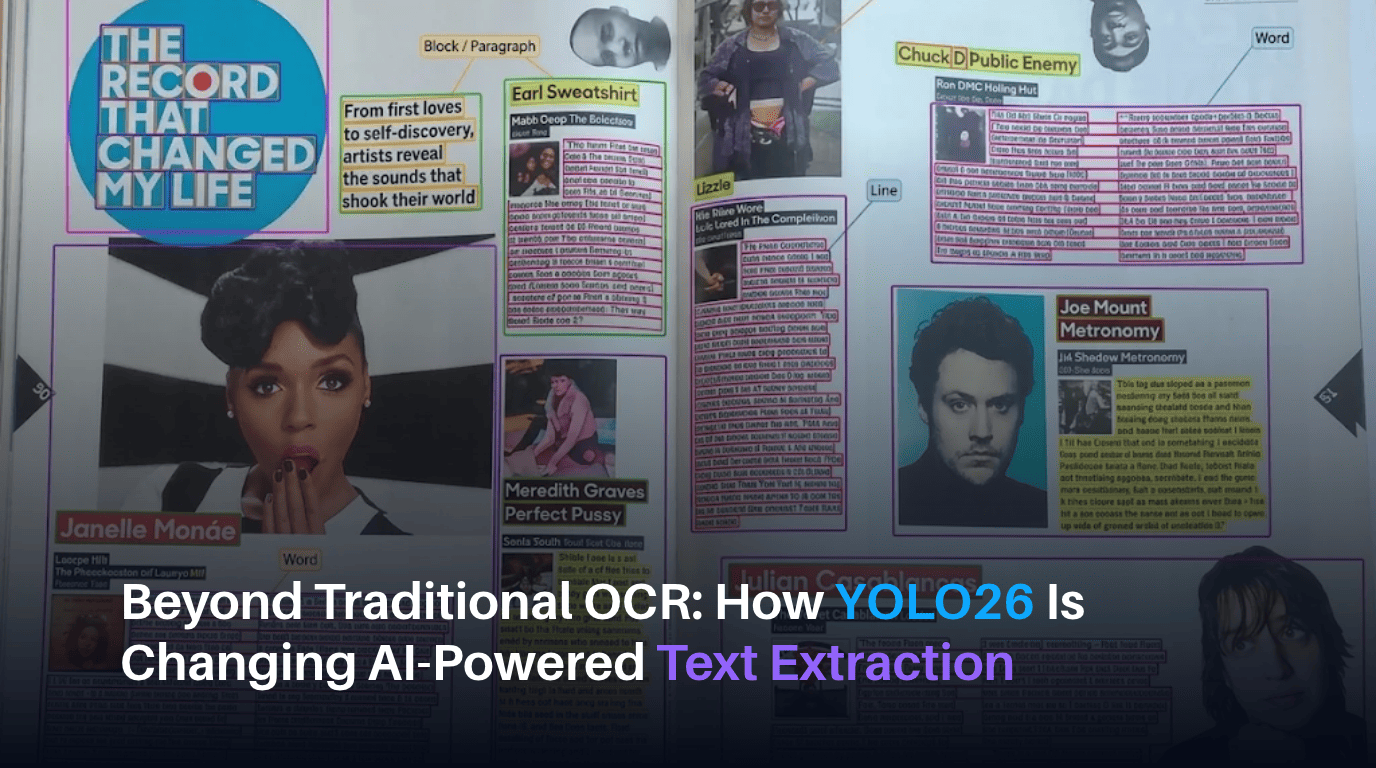
Instead of relying exclusively on conventional text detection methods, this approach uses deep learning to locate individual words, identify their orientation, and prepare them for recognition.
In this article, we explore how YOLO26 works, how it differs from traditional OCR, its practical applications, and why high-quality training data remains essential for building reliable text extraction systems.
What Is YOLO26 Text Extraction?
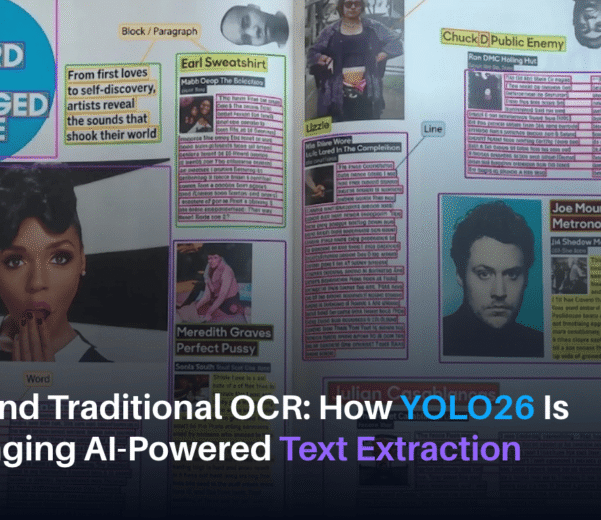
YOLO26 text extraction combines advanced computer vision with Optical Character Recognition (OCR) to detect and recognise text in images and documents. Ultralytics YOLO26-Text identifies text regions and their orientation using oriented bounding boxes, while a separate OCR recognition model, such as PaddleOCR PP-OCRv6, converts detected text into readable digital content.
This approach is particularly useful for processing rotated documents, product labels, street signs, receipts, and other images where traditional OCR systems may struggle with text positioning and complex backgrounds.
Key takeaway: YOLO26 does not replace OCR recognition engines. It improves the text detection stage, making it possible to build more flexible and efficient AI-powered text extraction pipelines.
What Is YOLO26 and How Does It Work?
YOLO26 is a computer vision model family developed by Ultralytics and introduced in January 2026. It builds on the You Only Look Once (YOLO) architecture, which is widely used for real-time object detection and visual analysis.
YOLO26 supports several computer vision tasks, including:
- Object detection.
- Instance segmentation.
- Image classification.
- Pose estimation.
- Oriented object detection.
- Semantic segmentation.
For text extraction, the relevant component is YOLO26-Text, a specialised text detection model that identifies words in images using oriented bounding boxes (OBBs).
Unlike a conventional OCR recognition engine, YOLO26-Text does not independently convert characters into readable text. Its primary responsibility is to determine where text appears and how it is positioned.
The detected regions can then be passed to a recognition model that identifies the characters.
This separation between detection and recognition makes the architecture flexible and allows developers to integrate different recognition technologies depending on their requirements.
How the YOLO26 OCR pipeline works
A typical YOLO26-based OCR workflow consists of five stages:
- Image acquisition: The system receives an image, scanned document, screenshot, or video frame.
- Text detection: YOLO26-Text identifies individual words and their locations.
- Orientation handling: Detected text regions are aligned to prepare them for recognition.
- Text recognition: An OCR recognition model converts the detected image regions into digital text.
- Structured output: The system returns recognised words alongside relevant coordinates, confidence information, and line relationships.
This combination enables developers to create OCR pipelines that can handle more complex visual environments.
Why Traditional OCR Systems Need a New Approach
Traditional OCR engines are effective when processing clean documents with clearly printed, horizontally aligned text.
However, real-world visual data introduces additional challenges.
Consider a photograph of a restaurant menu, a shipping label attached to a package, or a street sign captured by a moving vehicle. Text may appear in different sizes, directions, and lighting conditions.
Some of the most common OCR challenges include:
Rotated and misaligned text: Documents photographed using mobile phones may contain sideways, upside-down, or slightly tilted text.
Complex backgrounds: Text can overlap with photographs, graphics, advertisements, and textured surfaces.
Different text sizes: Small product labels, distant signs, and dense documents require accurate localisation before recognition.
Irregular layouts: Natural scenes frequently contain diagonal, vertical, curved, or differently positioned text.
Processing requirements: Organisations processing thousands of images or video frames need efficient detection and recognition workflows.
These challenges demonstrate why modern OCR systems need to combine accurate character recognition with advanced visual detection.
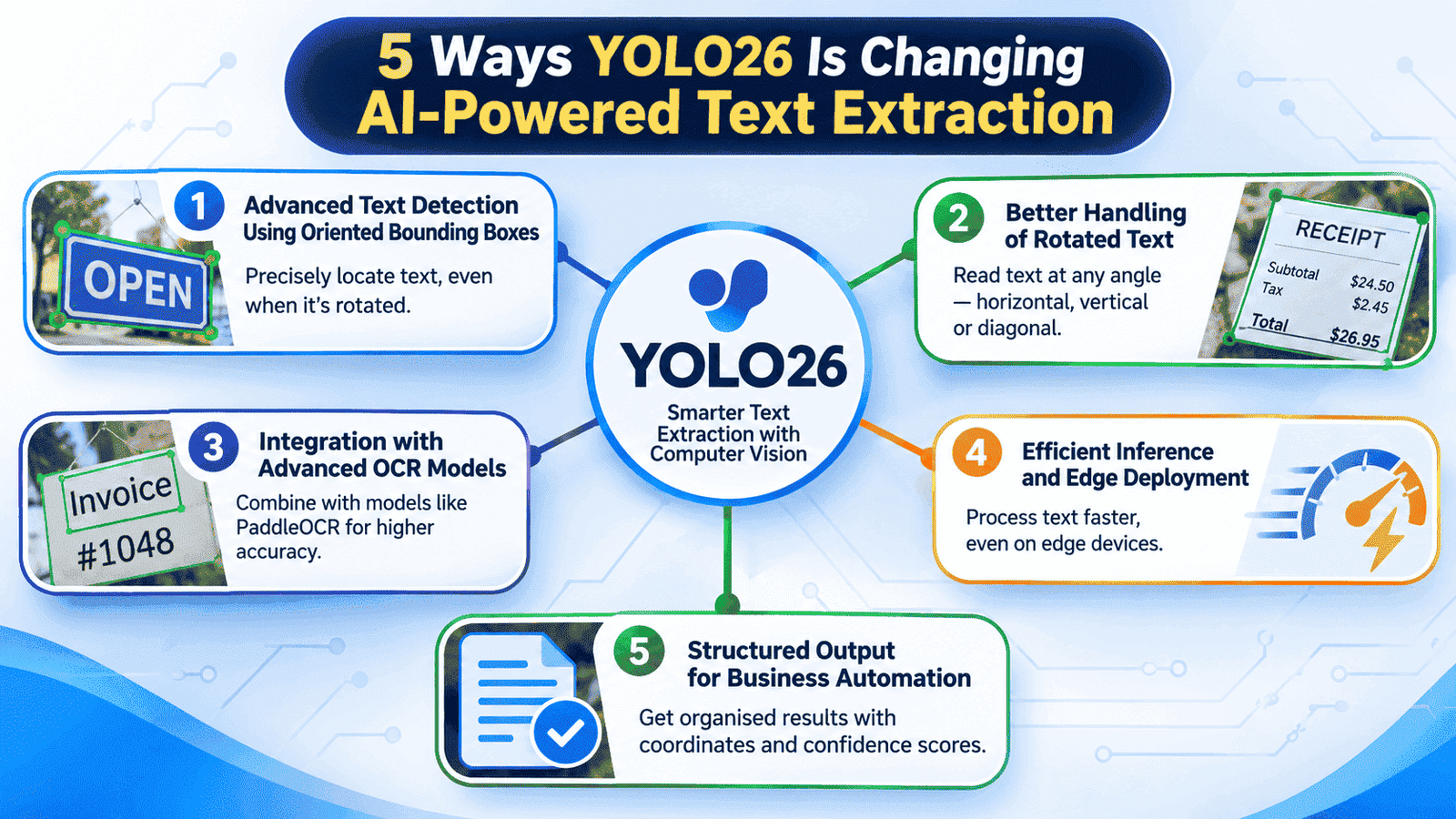
Five Ways YOLO26 Is Changing AI-Powered Text Extraction
3.1 Advanced Text Detection Using Oriented Bounding Boxes
One of the most important capabilities of YOLO26-Text is its use of oriented bounding boxes.
Traditional horizontal bounding boxes represent text regions using rectangular coordinates. When words are rotated, these boxes may include unnecessary background areas.
Oriented bounding boxes can follow the direction of the text more closely.
This is particularly useful when processing:
- Photographs of documents.
- Product packaging and labels.
- Street signs and advertisements.
- Shipping labels.
- Screenshots containing rotated text.
More precise text localisation can provide better image crops for the recognition stage.
3.2 Better Handling of Rotated Text
Text orientation is a common challenge in real-world OCR applications.
The Ultralytics OCR workflow combines text detection with orientation handling to process images containing sideways or upside-down text.
The system detects the direction of individual text regions and prepares them for recognition.
This can reduce the need for manual image correction and make OCR workflows more adaptable to different camera angles.
3.3 Integration with Advanced OCR Recognition Models
YOLO26-Text provides the detection component, while a separate recognition model performs character recognition.
Ultralytics’ documented OCR workflow combines YOLO26-Text with PaddleOCR’s PP-OCRv6 recognition model and uses ONNX Runtime for inference.
The separation provides several advantages:
- Developers can select different recognition models.
- Language-specific recognition can be configured.
- Detection and recognition can be evaluated independently.
- Custom recognition models can be integrated into specialised applications.
For example, an organisation processing Arabic invoices may use a suitable Arabic recognition model while retaining YOLO26-Text for text localisation.
3.4 Efficient Inference and Edge AI Deployment
Processing speed is an important consideration for computer vision applications.
YOLO26 introduces architectural improvements designed to simplify inference and improve deployment efficiency.
Some of its notable features include:
- Native end-to-end inference with an optional NMS-free detection path.
- A lighter detection head through the removal of Distribution Focal Loss (DFL).
- Improved training strategies.
- Support for deployment formats such as ONNX and TensorRT.
Ultralytics reports that YOLO26n achieves up to 43% faster CPU ONNX inference than YOLO11n under its reported Intel Xeon benchmark.
This can make YOLO26 useful for applications that need to process large volumes of visual information or operate on hardware with limited resources.
However, overall OCR processing speed also depends on image resolution, recognition model complexity, hardware, and the number of detected text regions.
3.5 Structured Output for Business Automation
Recognising text is only one part of an effective document processing workflow.
Businesses also need to organise extracted information into formats that can be used by databases, enterprise applications, and automated systems.
YOLO26-based OCR pipelines can return information such as:
- Recognised words.
- Detection and recognition confidence scores.
- Text line information.
- Geometric coordinates.
- Annotated images.
These outputs can be integrated into document management systems, data extraction platforms, and intelligent automation workflows.
For example, an invoice processing application can use OCR to extract text before a separate document understanding model identifies invoice numbers, supplier names, dates, and payment amounts.
YOLO26 vs. Traditional OCR: Key Differences
YOLO26 and traditional OCR engines perform different but complementary functions.
Traditional OCR focuses on identifying characters and converting visual text into digital information. YOLO26 contributes a specialised detection layer that identifies where text appears and how it is positioned.
Capability | Traditional OCR | YOLO26 + OCR |
Character recognition | Yes | Yes, through OCR |
Text localisation | Depends on engine | YOLO26-Text |
Oriented text detection | Varies | Supported |
Rotated text handling | Depends on implementation | Orientation handling in the OCR workflow |
Custom recognition models | Varies | Supported through integration |
Geometric coordinates | Varies | Available from detection |
Computer vision integration | Depends on platform | Part of YOLO ecosystem |
Does YOLO26 replace traditional OCR?
No. YOLO26 complements OCR recognition engines by improving the detection and localisation of text regions. A recognition model is still required to convert detected text into readable characters.
Real-World Applications of YOLO26-Powered OCR
The combination of computer vision and OCR recognition creates opportunities across several industries.
Document Digitisation and Automated Data Entry
Businesses process large volumes of invoices, contracts, receipts, application forms, and other documents.
YOLO26-based text detection can help locate words across complex layouts, while OCR recognition converts them into machine-readable content.
This can support:
- Document digitisation.
- Automated data entry.
- Invoice processing.
- Information retrieval.
- Digital document archiving.
Retail and Product Information Extraction
Retail environments contain large amounts of visual information, including product labels, price tags, promotional displays, and shelf signage.
AI-powered text extraction can help retailers capture product information, monitor prices, and analyse shelf conditions.
When combined with object detection and product recognition, OCR can become part of a wider retail automation system.
Intelligent Transportation Systems
Transportation systems rely on information captured by cameras installed in vehicles, roads, and parking facilities.
OCR can support the extraction of text from traffic signs, vehicle identification labels, and licence plates when integrated with suitable detection models.
YOLO26’s oriented text detection can be useful when visual information is captured from different camera angles.
Security and Access Control
Security systems use cameras to monitor entrances, restricted areas, and vehicle access points.
Text extraction can complement object detection by reading identification information, vehicle labels, and other visible text.
For example, an integrated system can detect a vehicle, locate its licence plate using a specialised detector, and send the cropped region to an OCR recognition model.
Multilingual Document Processing
International organisations frequently process documents containing different writing systems and languages.
YOLO26-Text provides a language-independent text detection component, while the selected recognition model determines which characters can be read.
Ultralytics documents language-specific recognition options, including Arabic, Cyrillic, Korean, Devanagari, and Thai, alongside the default PP-OCRv6 language coverage.
For reliable multilingual processing, organisations should validate recognition performance separately for each language and document type.
How to Implement YOLO26 for Text Extraction
Building a YOLO26-powered OCR pipeline requires selecting the appropriate detection model, recognition engine, and deployment environment.
A typical implementation follows six steps.
Step 1: Prepare the visual data
Collect representative images, scanned documents, screenshots, or video frames. Consider resolution, lighting, camera positioning, and image quality.
Step 2: Select the YOLO26-Text model
Ultralytics provides different model sizes, including nano, small, medium, large, and extra-large.
The appropriate model depends on the balance between detection accuracy, processing speed, and available hardware.
Step 3: Integrate an OCR recognition model
Use PP-OCRv6 or another compatible recognition model to convert detected text regions into readable content.
Step 4: Configure the processing pipeline
Adjust image resolution, language settings, recognition configuration, and confidence thresholds based on the application requirements.
Step 5: Evaluate performance
Test the solution using representative real-world data. Evaluate detection accuracy, character and word recognition quality, processing time, and performance across different image conditions.
Step 6: Deploy and monitor
Deploy the system using a suitable runtime, such as ONNX Runtime or TensorRT. Continuously monitor performance as new visual data is introduced.
Why High-Quality Training Data Still Matters
Even advanced computer vision architectures depend on the quality of the data used to train and evaluate them.
Text detection models need representative examples of different fonts, orientations, lighting conditions, backgrounds, and text sizes.
Recognition models also require accurately transcribed samples that reflect the languages and document types they are expected to process.
Poor-quality annotations can introduce errors that affect model performance, particularly in complex visual environments.
For organisations developing specialised OCR solutions, dataset preparation should include:
- Accurate text bounding boxes and oriented bounding boxes.
- Consistent transcription of visible text.
- Correct punctuation and special character handling.
- Language and script diversity.
- Examples of rotated, blurred, and low-resolution text.
- Quality assurance and annotation validation.
How SO Development Supports Computer Vision and OCR Projects
At SO Development, we support AI development teams with data collection, image and video annotation, text annotation, and quality assurance services.
Our services help organisations prepare high-quality datasets for computer vision training, OCR development, and AI model evaluation.
Whether a project involves document images, product labels, natural scene text, or multilingual visual datasets, consistent annotation and quality control are essential for building reliable AI systems.
Explore SO Development to learn more about our data collection and annotation capabilities.
The Future of AI-Powered Text Extraction
The evolution of OCR demonstrates how computer vision is moving beyond basic character recognition towards more comprehensive visual understanding.
YOLO26 represents an important development in this direction by combining advanced text localisation with specialised recognition models.
As businesses increasingly automate document processing, retail operations, transportation systems, and visual data analysis, demand for adaptable and efficient OCR pipelines will continue to grow.
The next stage will involve combining OCR with document understanding, multimodal AI, natural language processing, and intelligent automation.
The real opportunity is not simply to read text from images, but to transform visual information into structured, actionable business data.
With the right models, high-quality training data, and carefully designed processing pipelines, YOLO26-powered OCR can help organisations move closer to that goal.
Frequently Asked Questions (FAQs)
1. What is YOLO26 text extraction?
YOLO26 text extraction uses Ultralytics YOLO26-Text to locate and detect words in images, followed by an OCR recognition model that converts detected regions into digital text. It supports complex text positioning, including rotated text.
2. Can YOLO26 perform OCR without an additional recognition model?
No. YOLO26-Text is primarily responsible for detecting text regions. A separate recognition model, such as PaddleOCR PP-OCRv6, is required to identify characters and convert them into readable text.
3. What is the difference between YOLO26 and traditional OCR?
Traditional OCR engines focus on character recognition and text extraction. YOLO26 adds an advanced computer vision detection component that identifies text locations and orientations before recognition. Combining both creates a more flexible OCR pipeline.
4. Can YOLO26 recognise rotated or upside-down text?
Yes. The Ultralytics OCR workflow uses YOLO26-Text to detect oriented word regions and applies orientation handling before sending them to the recognition model.
5. Does YOLO26 support multilingual text extraction?
Yes. The text detection component can detect words across different scripts. Actual recognition language support depends on the selected OCR model. Ultralytics documents language-specific recognition options for scripts including Arabic, Cyrillic, Korean, Devanagari, and Thai.
6. Can YOLO26 extract text from PDFs?
Yes. PDF pages can be rendered as images and processed through the YOLO26 OCR pipeline. Recognised words can then be returned with associated positions and confidence information.
7. Is YOLO26 suitable for real-time OCR applications?
It can be suitable for real-time applications, depending on image resolution, model size, hardware, and recognition workload. Its detection architecture and support for CPU and GPU inference provide deployment flexibility.
8. What industries can benefit from YOLO26-powered OCR?
Retail, logistics, transportation, manufacturing, healthcare, financial services, and security can benefit from YOLO26-powered OCR. Applications include invoice processing, product label extraction, vehicle identification, and automated document digitisation.
9. What is the best YOLO26 model for OCR?
The appropriate model depends on the application’s requirements. Larger models can be considered when prioritising detection quality, while smaller models can be useful when processing speed and resource efficiency are more important. Performance should be evaluated against the target dataset.
10. Does YOLO26 replace traditional OCR software?
No. YOLO26 complements OCR technology by improving text detection and localisation. A recognition model is still required to convert detected text regions into readable characters.
11. How accurate is YOLO26 OCR?
Accuracy depends on the detection model, recognition engine, image resolution, language, and input quality. Organisations should evaluate word-level and character-level recognition performance using their own representative datasets.
12. How can businesses improve YOLO26 OCR performance?
Businesses can improve performance by using high-quality training datasets, accurate text annotations, appropriate image resolutions, suitable language-specific recognition models, and continuous quality assurance.
Technical References and Further Reading
For readers who want to explore the technology in more detail, the following official resources provide additional technical information:
- Ultralytics YOLO26 Documentation – Architecture, model capabilities, and supported tasks.
- Ultralytics OCR Guide – Text detection, recognition, and OCR implementation.
- Ultralytics YOLO26 Blog – Updates and technical insights about the YOLO26 ecosystem.
About SO Development
SO Development supports organisations building AI and machine learning solutions through data collection, image and video annotation, text annotation, transcription, and quality assurance. Our services help AI teams prepare and validate the data required for computer vision and other advanced AI applications.