Introduction
In computer vision, segmentation used to feel like the “manual labor” of AI: click here, draw a box there, correct that mask, repeat a few thousand times, try not to cry.
Meta’s original Segment Anything Model (SAM) turned that grind into a point-and-click magic trick: tap a few pixels, get a clean object mask. SAM 2 pushed further to videos, bringing real-time promptable segmentation to moving scenes.
Now SAM 3 arrives as the next major step: not just segmenting things you click, but segmenting concepts you describe. Instead of manually hinting at each object, you can say “all yellow taxis” or “players wearing red jerseys” and let the model find, segment, and track every matching instance in images and videos.
This blog goes inside SAM 3—what it is, how it differs from its predecessors, what “Promptable Concept Segmentation” really means, and how it changes the way we think about visual foundation models.
1. From SAM to SAM 3: A short timeline
Before diving into SAM 3, it helps to step back and see how we got here.
SAM (v1): Click-to-segment
The original SAM introduced a powerful idea: a large, generalist segmentation model that could segment “anything” given visual prompts—points, boxes, or rough masks. It was trained on a massive, diverse dataset and showed strong zero-shot segmentation performance across many domains.
SAM 2: Images and videos, in real time
SAM 2 extended the concept to video, treating an image as just a one-frame video and adding a streaming memory mechanism to support real-time segmentation over long sequences.
Key improvements in SAM 2:
Unified model for images and videos
Streaming memory for efficient video processing
Model-in-the-loop data engine to build a huge SA-V video segmentation dataset
But SAM 2 still followed the same interaction pattern: you specify a particular location (point/box/mask) and get one object instance back at a time.
SAM 3: From “this object” to “this concept”
SAM 3 changes the game by introducing Promptable Concept Segmentation (PCS)—instead of saying “segment the thing under this click,” you can say “segment every dog in this video” and get:
All instances of that concept
Segmentation masks for each instance
Consistent identities for each instance across frames (tracking)
In other words, SAM 3 is no longer just a segmentation tool—it’s a unified, open-vocabulary detection, segmentation, and tracking model for images and videos.
2. What exactly is SAM 3?
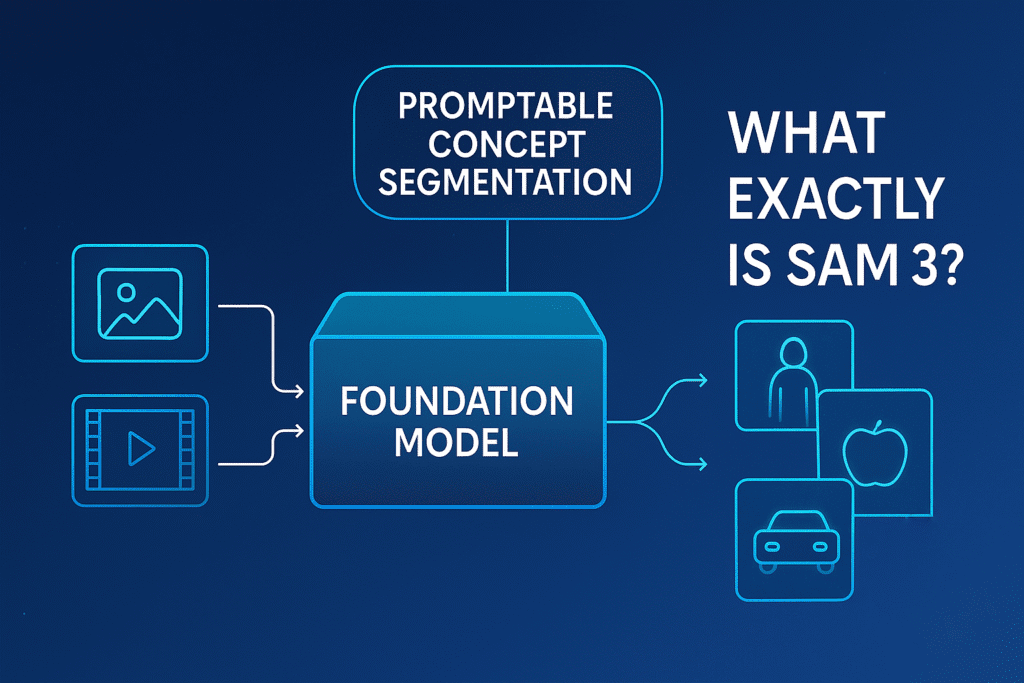
At its core, SAM 3 is a unified foundation model for promptable segmentation in images and videos that operates on concept prompts.
Core capabilities
According to Meta’s release and technical overview, SAM 3 can:
Detect and segment objects
Given a text or visual prompt, SAM 3 finds all matching object instances in an image or video and returns instance masks.
Track objects over time
For video, SAM 3 maintains stable identities, so the same object can be followed across frames.
Work with multiple prompt types
Text: “yellow school bus”, “person wearing a backpack”
Image exemplars: example boxes/masks of an object
Visual prompts: points, boxes, masks (SAM 2-style)
Combined prompts: e.g., “red car” + one exemplar, for even sharper control
Support open-vocabulary segmentation
It doesn’t rely on a closed set of pre-defined classes. Instead, it uses language prompts and exemplars to generalize to new concepts.
Scale to large image/video collections
SAM 3 is explicitly designed to handle the “find everything like X” problem across large datasets, not just a single frame.
Compared to SAM 2, SAM 3 formalizes PCS and adds language-driven concept understanding while preserving (and improving) the interactive segmentation capabilities of earlier versions.
3. Promptable Concept Segmentation (PCS): The big idea
“Promptable Concept Segmentation” is the central new task that SAM 3 tackles. You provide a concept prompt, and the model returns masks + IDs for all objects matching that concept.
Concept prompts can be:
Text prompts
Simple noun phrases like “red apple”, “striped cat”, “football player in blue”, “car in the left lane”.
Image exemplars
Positive/negative example boxes around objects you care about.
Combined prompts
Text + exemplars, e.g., “delivery truck” plus one example bounding box to steer the model.
This is fundamentally different from classic SAM-style visual prompts:
| Feature | SAM / SAM 2 | SAM 3 (PCS) |
|---|---|---|
| Prompt type | Visual (points/boxes/masks) | Text, exemplars, visual, or combinations |
| Output per prompt | One instance per interaction | All instances of the concept |
| Task scope | Local, instance-level | Global, concept-level across frame(s) |
| Vocabulary | Implicit, not language-driven | Open-vocabulary via text + exemplars |
This means you can do things like:
“Find every motorcycle in this 10-minute traffic video.”
“Segment all people wearing helmets in a construction site dataset.”
“Count all green apples versus red apples in a warehouse scan.”
All without manually clicking each object. The dream of “query-like segmentation at scale” is much closer to reality.
4. Under the hood: How SAM 3 works (conceptually)
Meta has published an overview and open-sourced the reference implementation via GitHub and model hubs such as Hugging Face.
While the exact implementation details are in the official paper and code, the high-level ingredients look roughly like this:
Vision backbone
A powerful image/video encoder transforms each frame into a rich spatiotemporal feature representation.
Concept encoder (language + exemplars)
Text prompts are encoded using a language model or text encoder.
Visual exemplars (e.g., boxes/masks around an example object) are encoded as visual features.
The system fuses these into a concept embedding that represents “what you’re asking for”.
Prompt–vision fusion
The concept embedding interacts with the visual features (e.g., via attention) to highlight regions that correspond to the requested concept.
Instance segmentation head
From the fused feature map, the model produces:
Binary/soft masks
Instance IDs
Optional detection boxes or scores
Temporal component for tracking
For video, SAM 3 uses mechanisms inspired by SAM 2’s streaming memory to maintain consistent identities for objects across frames, enabling efficient concept tracking over time.
You can think of SAM 3 as “SAM 2 + a powerful vision-language concept engine,” wrapped into a single unified model.
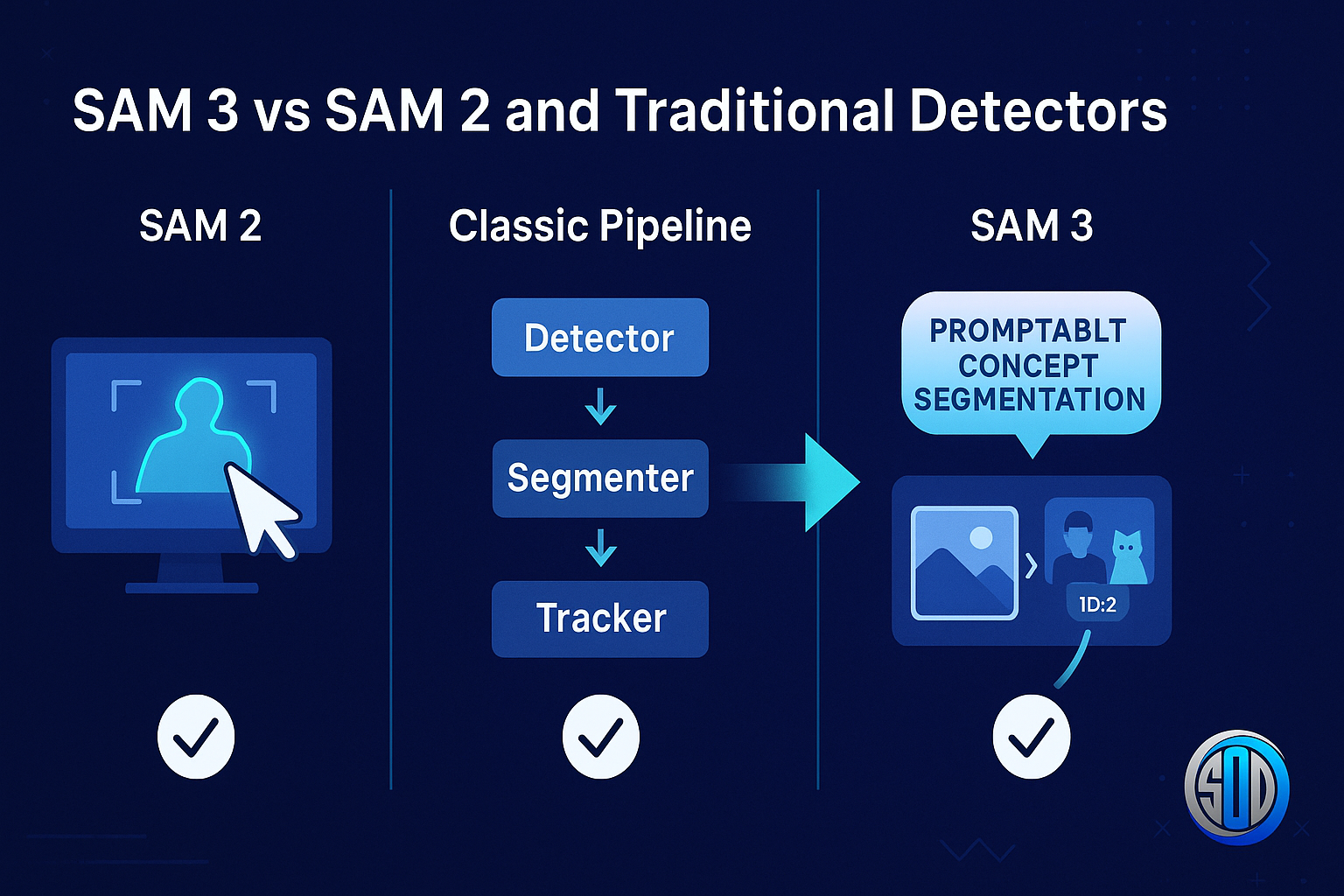
5. SAM 3 vs SAM 2 and traditional detectors
How does SAM 3 actually compare to previous systems?
Compared to SAM 2
From Meta’s and third-party analyses:
PCS performance
SAM 3 achieves roughly 2× performance gains over previous systems on Promptable Concept Segmentation benchmarks, while still being strong for interactive segmentation.
Prompt flexibility
SAM 2: visual prompts only (points/boxes/masks).
SAM 3: text, exemplars, visual prompts, or combinations.
Scope of operation
SAM 2: excellent for “segment this object here” in images/videos.
SAM 3: built for “segment every instance of this concept across images/videos”.
Open-vocabulary behavior
SAM 2 generalizes well, but without explicit language grounding.
SAM 3 explicitly integrates language, allowing prompts like “person holding a smartphone” or “small boats near the shore”.
Compared to classic detection + segmentation pipelines
Traditional pipelines often combine:
A detector (e.g., YOLO, Faster R-CNN) for bounding boxes
A segmentation model (e.g., Mask R-CNN, DeepLab) for masks
A tracker (e.g., SORT, ByteTrack) for linking objects across frames
SAM 3 aims to unify these steps in one model:
Single foundation model for concept detection, segmentation, and tracking
Open-vocabulary: not limited by a fixed class list
Promptable: behavior controlled by language and exemplars
That does not mean classic detectors are obsolete—YOLO-style models can still be more efficient for pure detection on fixed label sets—but for flexible, open-ended visual understanding, SAM 3 offers a more general solution.
6. Real-world use cases for SAM 3
SAM 3 is not just an academic toy; Meta is already integrating it into production systems and tooling.
Here are some concrete scenarios where SAM 3 is especially impactful:
6.1. Large-scale dataset creation and labeling
If you are building a dataset for:
Autonomous driving
Robotics
Retail analytics
Medical imaging (where appropriate prompts/datasets exist)
you often need to segment thousands or millions of object instances. SAM 3 can:
Use text prompts (“pedestrian”, “bicycle”, “traffic light”) to auto-segment candidates.
Use few exemplars to quickly adapt to new object types.
Provide consistent tracking IDs across video frames, greatly accelerating annotation.
Human annotators can then verify and refine these masks instead of drawing everything from scratch.
6.2. Video understanding and analytics
For video analytics:
“Track all people entering through this door over the day.”
“Segment all cars going through the leftmost lane.”
“Detect and segment all items placed on a specific shelf.”
SAM 3 can handle these concept-based requests in a single unified framework while maintaining stable object identities.
6.3. AR/VR and creative tools
Meta highlights use in consumer apps, including enhanced editing features in tools like Instagram’s media editing flow.
Examples:
Creators can prompt “highlight all people” or “select the sky and mountains” to apply effects.
Users can remove or restyle specific concepts—“change all cars to blue”—without tedious manual masks.
6.4. Robotics and embodied AI
For robots operating in the real world, concept-level segmentation is incredibly useful:
“Pick up all red blocks.”
“Avoid people and pets.”
“Locate all tools on the workbench.”
SAM 3’s open-vocabulary and concept tracking features make it easier to connect symbolic instructions (language) to grounded, visual perception in dynamic environments.
7. Getting hands-on with SAM 3
Meta has released SAM 3 openly, including:
A dedicated product and docs page.
An official GitHub repository with inference and fine-tuning code.
Model checkpoints and configs on Hugging Face.
A Segment Anything Playground for interactive experimentation in the browser.
Typical workflow (high-level)
Install dependencies and download checkpoints
Follow the instructions in the
facebookresearch/sam3repository to install required Python packages and retrieve model weights.
Load a SAM 3 model
Choose a variant (e.g., base/large), load from checkpoint, and move it to your preferred device (CPU/GPU).
Prepare your prompt
Text prompt, image exemplars, or both.
Run inference
Call the appropriate API from the GitHub repo to obtain masks and tracking identities for your images/videos.
Post-process and visualize
Overlay masks on frames, track IDs across time, export to annotation formats (COCO, YOLO, etc.) or integrate into downstream pipelines.
The official docs and third-party tutorials (e.g., Roboflow, Ultralytics, community blogs) already show end-to-end examples of using SAM 3 for concept-level segmentation and tracking.
8. Limitations, challenges, and open questions
As impressive as SAM 3 is, it is not a magic wand. Some important caveats:
8.1. Ambiguous or complex language
Open-vocabulary is powerful, but prompts like “cool car” or “interesting object” are unpredictable. Even more precise prompts (“person holding a red bag”) can be tricky in cluttered scenes or edge cases.
Designing good prompts and adding exemplars will remain important for robust behavior.
8.2. Compute and memory requirements
SAM 3 is a large foundation model. Running it on high-resolution videos, especially for large datasets, requires:
Significant GPU memory
Efficient batching and streaming strategies
Careful integration into production systems
For lightweight or on-edge tasks, classic detectors or smaller segmentation models may still be preferable.
8.3. Bias and fairness
Because SAM 3 is trained on large-scale visual and textual data, it can inherit:
Dataset biases
Geographic, demographic, and context skew
Careful evaluation is needed when using SAM 3 in sensitive domains (e.g., surveillance, hiring, medical triage). The open release allows third-party audits, but responsible deployment is still up to practitioners.
8.4. Long-horizon video and occlusion
Tracking many concept instances over long videos with heavy occlusions is still a hard problem. SAM 3 improves over SAM 2, but there will still be identity switches, missed objects, and noisy masks—especially in very crowded or low-visibility scenes.
9. Why SAM 3 matters
SAM 3 is significant for several reasons:
Unification of tasks
Detection, segmentation, and tracking are integrated into one foundation model instead of three separate pipelines.
Language-native segmentation
You can control vision perception directly with text—bridging language models and vision models more naturally.
Scaling from interaction to retrieval
Earlier SAM models were about interacting with single images and frames.
SAM 3 scales to “retrieve all instances of X” across large corpora of images and videos.
Ecosystem openness
Meta released weights, benchmarks, and code—enabling researchers and industry teams to fine-tune, adapt, and build on top of SAM 3
In many ways, SAM 3 does for segmentation what modern LLMs did for language: it turns a narrow, task-specific tool into a general-purpose, promptable foundation system.
Conclusion
SAM 3 marks a clear shift in how we think about segmentation: from “draw masks around objects” to “ask for concepts and let the model handle the rest.”
By unifying detection, segmentation, and tracking around Promptable Concept Segmentation, and making text + exemplar prompts first-class citizens, SAM 3 opens the door to:
Faster and cheaper dataset creation
More flexible video analytics
Smarter AR/VR and creative tools
Stronger perception for robots and embodied agents
There is still plenty of work ahead—reducing compute needs, handling complex prompts, mitigating bias, and improving long-term tracking—but the direction is clear.
If SAM was “segment anything you can point at,” SAM 3 is closer to “segment anything you can describe.” And that’s a big step toward genuinely multimodal, concept-aware AI systems that see the world a bit more like we do—minus the eye strain.