Introduction
Edge AI is transforming how computer vision systems are deployed, moving intelligence from the cloud directly onto devices operating in real time. NVIDIA Jetson platforms make this possible by combining GPU acceleration, low power consumption, and optimized AI software stacks.
With the latest Ultralytics YOLO26 model, developers can achieve faster inference, improved detection accuracy, and efficient deployment on embedded systems. When combined with NVIDIA DeepStream SDK and TensorRT optimization, YOLO26 becomes a powerful solution for real-time video analytics at the edge.
This guide walks through end-to-end integration of YOLO26 with DeepStream on Jetson, enabling scalable, production-ready object detection pipelines.
Why DeepStream for Edge AI?
Running raw inference scripts works for experimentation, but production deployments require:
High-throughput video processing
Hardware acceleration
Multi-stream scalability
Efficient memory handling
Pipeline-based architecture
DeepStream provides:
✅ GPU-accelerated video decoding
✅ Zero-copy memory pipelines
✅ Batch inference support
✅ Built-in tracking and analytics
✅ RTSP and camera streaming support
Instead of processing frames manually, DeepStream builds optimized pipelines using GStreamer.
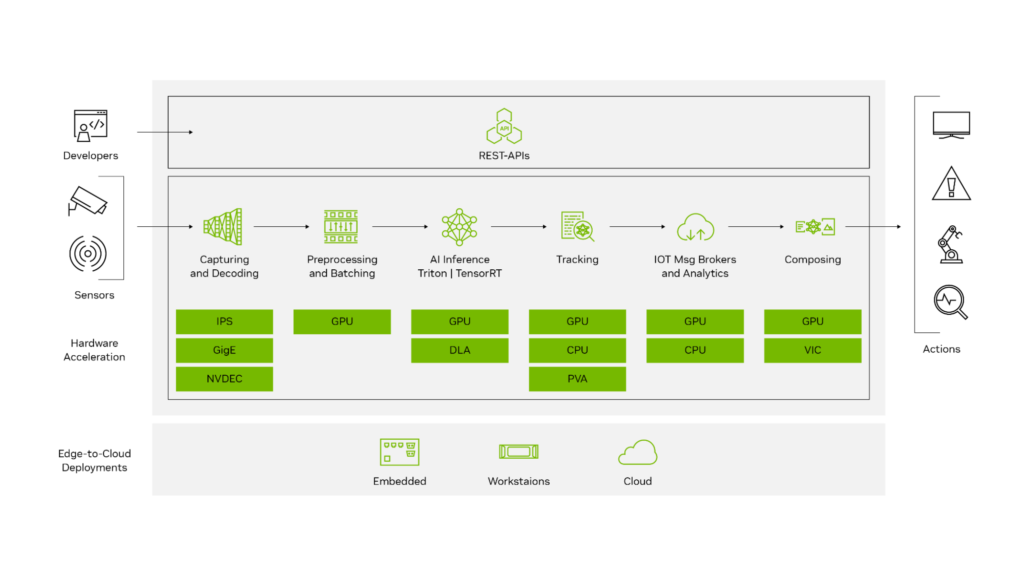
System Architecture Overview
The deployment stack looks like this:
Camera / Video Stream
        ↓
Video Decode (NVDEC)
        ↓
DeepStream Pipeline
        ↓
TensorRT Engine (YOLO26)
        ↓
Object Detection Metadata
        ↓
Display / Stream / Analytics
Key components:
| Component | Purpose |
|---|---|
| YOLO26 | Object detection model |
| TensorRT | Optimized inference engine |
| DeepStream | Video analytics pipeline |
| Jetson GPU | Hardware acceleration |
Hardware Requirements
Supported Jetson platforms:
Jetson Nano (limited performance)
Jetson Xavier NX
Jetson AGX Xavier
Jetson Orin Nano
Jetson Orin NX
Jetson AGX Orin (recommended)
Recommended minimum:
8GB RAM
JetPack 6.x
CUDA + TensorRT installed
Software Stack
Ensure the following are installed:
JetPack SDK
CUDA Toolkit
TensorRT
DeepStream SDK
Python 3.8+
Ultralytics framework
Verify installation:
deepstream-app --version-allStep 1 — Install Ultralytics YOLO26
Clone and install dependencies:
pip install ultralyticsTest inference:
yolo predict model=yolo26.pt source=bus.jpgIf inference works, proceed to export.
Step 2 — Export YOLO26 to ONNX
DeepStream uses TensorRT engines, so first export the model.
yolo export model=yolo26.pt format=onnx opset=12Output:
yolo26.onnxVerify ONNX model:
pip install onnxruntime
python -c "import onnx; onnx.load('yolo26.onnx')"
Step 3 — Convert ONNX to TensorRT Engine
Use TensorRT to optimize inference for Jetson GPU.
/usr/src/tensorrt/bin/trtexec \
  --onnx=yolo26.onnx \
  --saveEngine=yolo26.engine \
  --fp16
Optional INT8 optimization (advanced):
--int8 --calib=calibration.cacheBenefits:
Lower latency
Reduced memory usage
Hardware-specific optimization
Step 4 — Integrate YOLO26 with DeepStream
DeepStream requires a custom parser for YOLO outputs.
Directory Structure
deepstream_yolo26/
 ├── config_infer_primary.txt
 ├── yolo26.engine
 ├── labels.txt
 └── custom_parser.cpp
Configure Primary Inference
Create:
config_infer_primary.txt
[property]
gpu-id=0
net-scale-factor=0.003921569
model-engine-file=yolo26.engine
labelfile-path=labels.txt
batch-size=1
network-mode=2
num-detected-classes=80
process-mode=1
gie-unique-id=1
Network modes:
0 → FP32
1 → INT8
2 → FP16
Custom Bounding Box Parser
YOLO models output tensors differently from standard detectors.
You must implement a parser that converts raw outputs into:
bounding boxes
class IDs
confidence scores
Compile parser:
makeOutput:
LZ4ezwuSpTeD9pQKcUaPpHYUhy53QerXiDStep 5 — Modify DeepStream App Config
Edit:
deepstream_app_config.txtSet primary inference:
[primary-gie]
enable=1
config-file=config_infer_primary.txt
Step 6 — Run DeepStream Pipeline
Launch:
deepstream-app -c deepstream_app_config.txtYou should see:
✅ Real-time detections
✅ Bounding boxes rendered
✅ GPU utilization active
Performance Optimization Tips
1. Use FP16 or INT8
FP16 typically provides:
2–3× faster inference
Minimal accuracy loss
INT8 gives maximum performance but requires calibration.
2. Increase Batch Size (Multi-Stream)
batch-size=4Useful for multiple RTSP cameras.
3. Enable Zero-Copy Memory
DeepStream automatically uses NVMM buffers to avoid CPU copies.
4. Use Hardware Decoder
Ensure pipeline uses:
nvv4l2decoderinstead of software decoding.
Expected Performance (Approximate)
| Device | FPS (YOLO26 FP16) |
|---|---|
| Jetson Nano | 6–10 FPS |
| Xavier NX | 25–40 FPS |
| Orin Nano | 40–70 FPS |
| AGX Orin | 90–150 FPS |
Performance varies with resolution and model size.
Real-World Use Cases
YOLO26 + DeepStream enables:
Smart city surveillance
Retail analytics
Industrial safety monitoring
Traffic analysis
Robotics perception
Autonomous inspection systems
Troubleshooting
Engine Not Loading
Rebuild engine directly on Jetson:
trtexec --onnx=model.onnxTensorRT engines are hardware-specific.
No Bounding Boxes Appearing
Check:
parser library path
class count
output tensor names
Low FPS
Verify GPU usage:
tegrastatsCommon causes:
CPU decoding
FP32 inference
incorrect batch configuration
Best Practices for Production
Build TensorRT engines on target hardware
Use RTSP streams for scalability
Enable tracking plugins
Log inference metadata
Containerize with Docker
Conclusion
Integrating YOLO26 with DeepStream on NVIDIA Jetson unlocks a highly optimized edge AI pipeline capable of real-time video analytics at production scale.
By combining:
YOLO26 detection accuracy
TensorRT acceleration
DeepStream pipeline efficiency
Jetson edge hardware
developers can deploy scalable, low-latency AI systems without relying on cloud infrastructure.
This workflow forms a strong foundation for next-generation edge vision applications across industries.